Fences 6.46 Release Feedback
With the Fences 6.46 release, we are creating this thread so that users can report any observed issues.
Known issues
While we appreciate all feedback, please remember that we offer no official support for beta \ preview \ developer channel versions of Windows. If you report issues while in any of those early release channels, you should not expect them to be addressed unless it still exists in a retail version of Windows.
***Reserved***
I have recently changed to using a single 50" TV instead of my former dual 24" monitors. At night I surn off the TV but the PC stays fully running. In the morning I turn the TV on & some but not all of my fences have the icons squashed together or some overlap each other. Pulling the edge of each fence out of expand it corrects it but whether I leave it too wide or revert to normal I get the same scenario in next time I power off the TV. Hope there's an easy fix. Your thoughts..............
Hello,
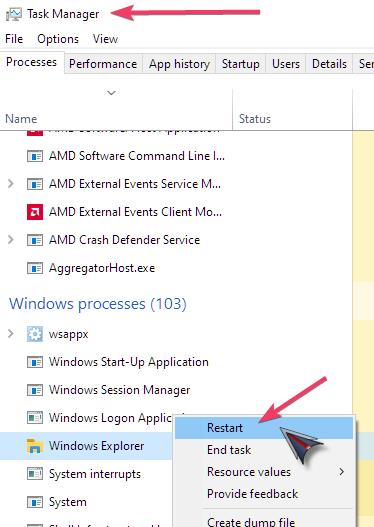
Sorry to hear you are having issues. If you just restart Explorer.exe, does the issue resolved itself?

Thank you,
Basj,
Stardock Community Assistant.
I'm not sure if it's okay to post general feedback here rather than a bug report, but I have a suggestion regarding the UI.
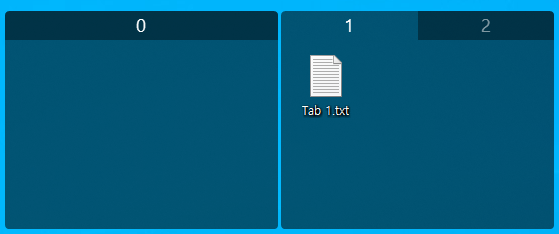
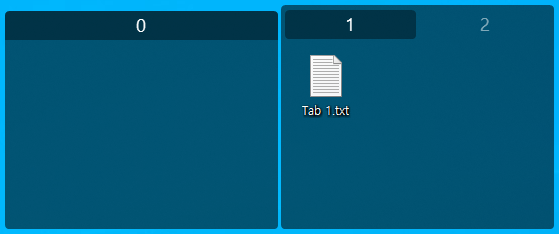
It would be great to have an option to invert the behavior of active tab color for the "Segmented" Tab Style under Personalization (i.e., making the active tab's title background dark and the inactive tabs' backgrounds light).
Currently, the active tab background in the Segmented style is displayed in a light color, which contradicts the behavior of all other Fences.
Particularly, when switching from the "Rounded" style to the "Segmented" style, this opposite visual behavior is quite confusing. Adding a toggle to match the behavior of other styles would greatly improve the user experience.
Thank you for your time and for making a great product!


I'm not sure if it's okay to post general feedback here rather than a bug report, but I have a suggestion regarding the UI.
It would be great to have an option to invert the behavior of active tab color for the "Segmented" Tab Style under Personalization (i.e., making the active tab's title background dark and the inactive tabs' backgrounds light).
Currently, the active tab background in the Segmented style is displayed in a light color, which contradicts the behavior of all other Fences.
Particularly, when switching from the "Rounded" style to the "Segmented" style, this opposite visual behavior is quite confusing. Adding a toggle to match the behavior of other styles would greatly improve the user experience.
Thank you for your time and for making a great product!
I completely agree, the current behavior feels inconsistent, and I would also love to see this added as an option in the settings.
I have a few pieces of general feedback as well:
Peek Hotkey & Rollup Fences: It would be great to have a setting where Rollup Fences are automatically revealed when bringing up Fences using the Peek hotkey. Currently, even when Fences are shown via the hotkey, Rollup Fences remain collapsed. Having to hover the mouse over them to see the contents decreases productivity, which ultimately makes me stop using the Rollup feature entirely.
Hide's Auto-hide Timing: For the Automatically hide icons when desktop is not in use setting under Hide, it would be very helpful if users could customize the delay time before the icons are hidden.
I'm not sure if it's okay to post general feedback here rather than a bug report, but I have a suggestion regarding the UI.
It would be great to have an option to invert the behavior of active tab color for the "Segmented" Tab Style under Personalization (i.e., making the active tab's title background dark and the inactive tabs' backgrounds light).
Currently, the active tab background in the Segmented style is displayed in a light color, which contradicts the behavior of all other Fences.
Particularly, when switching from the "Rounded" style to the "Segmented" style, this opposite visual behavior is quite confusing. Adding a toggle to match the behavior of other styles would greatly improve the user experience.
Thank you for your time and for making a great product!
I completely agree, the current behavior feels inconsistent, and I would also love to see this added as an option in the settings.
I have a few pieces of general feedback as well:
Peek Hotkey & Rollup Fences: It would be great to have a setting where Rollup Fences are automatically revealed when bringing up Fences using the Peek hotkey. Currently, even when Fences are shown via the hotkey, Rollup Fences remain collapsed. Having to hover the mouse over them to see the contents decreases productivity, which ultimately makes me stop using the Rollup feature entirely.
Hide's Auto-hide Timing: For the Automatically hide icons when desktop is not in use setting under Hide, it would be very helpful if users could customize the delay time before the icons are hidden.
Hello,
I have forwarded your requests to the Stardock Support Team for their review and recommendations. We really do appreciate your feedback, Thanks
Basj,
Stardock Community Assistant.
Hello all,
Fences 6 beta (6.52) is now available. For details, please see:
https://forums.stardock.com/541769/fences-6-52-beta-feedback/page/1
Thank you as always for your time, feedback, and support.
Best regards,
Adam McGuinness
Stardock Support Specialist
Subject: Fences 6.46 - reproducible system freezes tied to explorer.exe, confirmed via Clean Boot test
Hi all,
I've spent the past two weeks tracking down a recurring system freeze on my Windows 11 Pro machine, and the evidence now points fairly specifically at Fences. Posting here in case anyone else has seen this, or Stardock support can help.
Symptom Keyboard input (typing, Backspace/Delete, Enter, Ctrl+V) intermittently stalls or queues for anywhere from a few seconds to over five minutes. Input isn't lost, it's delayed - it eventually "catches up" all at once, often garbled because I've already started retyping. Mouse input is unaffected throughout. Not confined to one app; I've seen it in browser tabs, code editors, and Windows' own UI.
What I've found
Clean Boot test I ran a proper Clean Boot (all non Microsoft services disabled, all startup apps disabled except Fences, three other Stardock products I don't use - Start11, Groupy, IconPackager - fully uninstalled beforehand) and left background performance logging running (typeperf, sampling every second: CPU percent, Interrupts/sec, Context Switches/sec, explorer.exe CPU percent and thread count).
With Fences as the only third party software active, the freeze still occurred. One episode was severe enough that even the separate background logging process itself stalled for over four minutes, which tells me this isn't narrowly a keyboard input quirk, it's a genuine system level stall coming from somewhere in Explorer's process.
System info
I have detailed timestamped logs (typeperf CSVs) covering multiple episodes including the Clean Boot test if that would help. Has anyone else seen explorer.exe instability tied to Fences on 6.44/6.46? I saw the release feedback thread about the "Explorer failed to close properly" issue from 6.44, which I also hit personally in April, so I know that version had real problems, but this feels like it may be a related or ongoing issue rather than something fully resolved in 6.46.
Any guidance appreciated.
Thanks, Wayne
Hello all,
Fences 6.52 has now been released. For details and feedback, please see:
https://forums.stardock.com/542120/fences-6-52-release-feedback/page/1
Thank you as always for your time and support.
Best regards,
Adam McGuinness
Stardock Support Specialist
Welcome Guest! Please take the time to register with us.