Abisnabidam Abisnabidam

DeskScapes 2026 Release Feedback Thread

DeskScapes 2026 Release Feedback Thread

Obtaining the product

Object Desktop members can get the release from within Object Desktop Manager 

Individual purchases (as well as Object Desktop Members) can also be obtained from your account page: https://store.stardock.com/myaccount/products

For guest check-out purchase (no account), from this link: http://www.stardock.com/support/productkeyretrieval

Reporting an issue

Please include the following for anything found:

  • Exact Windows version \ build (winver.exe)

  • Detailed steps to recreate the issue seen

  • Screenshots and videos are very helpful.  Videos can be uploaded to a cloud drive service (GoogleDrive, DropBox, OneDrive, YouTube), with a shared link included in your post.  Images can be copied and pasted directly into a post.

  • If there are specific apps that the app does not work (well) with, please note what apps and their exact versions.  If any app is not common, a link to a trial version would be appreciated.

Thank you for your interest and any time you put into making DeskScapes 2026 a better product.


4,506 views 112 replies
Reply #101 Top

I can't activate the product. It says my OD license is not valid for my email address but both are correct.

Windows 11 25H2 build26200.8894


Nevermind, the m key stuttered.

Reply #102 Top
Quoting gevansmd, reply 3995893

I can't activate the product. It says my OD license is not valid for my email address but both are correct.

Windows 11 25H2 build26200.8894

End of gevansmd's quote

Hello,

Sorry to hear you are having issues. For account issue, please raise support ticket using the link below, use the "Ask a Question" option. Include all information details. Remember to record down the ticket number for future reference if needed. Do not raise multiple ticket, that will make your ticket back to the end of the line. Send once and wait. Ticket will be answer by the order they send in.

https://stardock.atlassian.net/servicedesk/customer/portal/4/group/14

Thanks
Basj,
Stardock Community Assistant

Reply #103 Top

Did all of the purge on the laptop. Still not working like the one on my desktop. For example, when I go to apply an animated wallpaper, on the top right before I even apply it, the screen is black (this is above the effects listing). However, I did get it to function after I applied the paper to the monitor. 

Reply #104 Top
Quoting Sunwheel9, reply 3996008

Did all of the purge on the laptop. Still not working like the one on my desktop. For example, when I go to apply an animated wallpaper, on the top right before I even apply it, the screen is black (this is above the effects listing). However, I did get it to function after I applied the paper to the monitor.

End of Sunwheel9's quote

Hello,

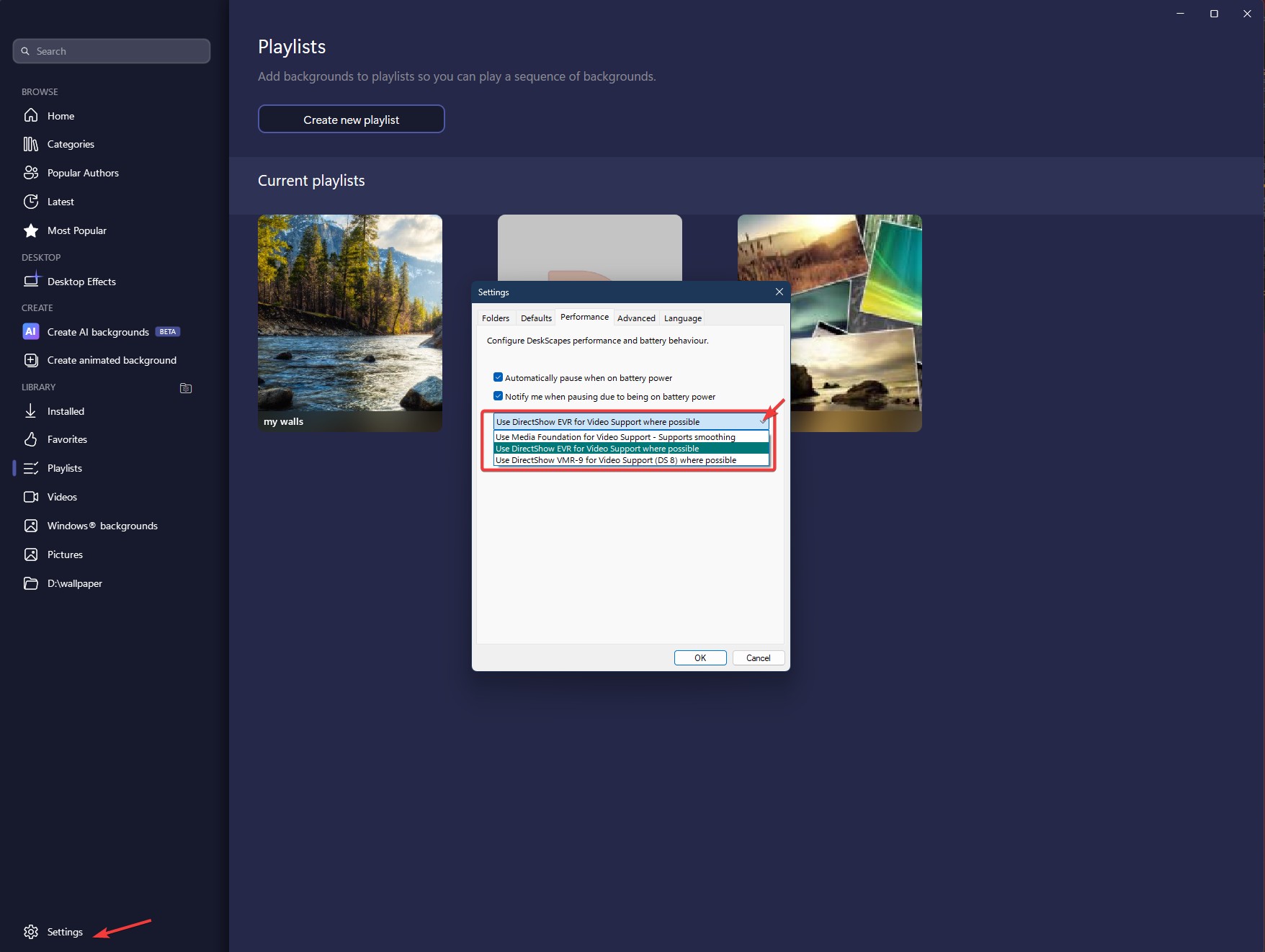
Sorry to hear you are having issues. Have you tried updating the codec? Also see if changing this sitting helps.

Thank you,

Basj,

Stardock Community  Assistant.

Reply #105 Top

I wouldn't know how to update the codec.

Setting was already on DirectShow.

Reply #106 Top
Quoting Sunwheel9, reply 3996028

I wouldn't know how to update the codec.

Setting was already on DirectShow.

End of Sunwheel9's quote

Just download and install the latest codec pack, You can use this one: https://codecguide.com/download_kl.htm 

Thank you,

Basj,

Stardock Community  Assistant

Reply #107 Top

Installed Codec Standard package and it changed nothing. And I found another problem: when I search for other animations in the app, it crashes. None of these problems exist on my desktop PC installation.

Reply #108 Top
Quoting Sunwheel9, reply 3996038

Installed Codec Standard package and it changed nothing. And I found another problem: when I search for other animations in the app, it crashes. None of these problems exist on my desktop PC installation.

End of Sunwheel9's quote

Perhaps something is blocking Deskscapes from working properly, please try clean boot: https://support.stardock.com/space/SHC/1346928700/DeskScapes+Clean+Boot. Do note that Clean boot need to be done with care. Try it and report back.

Thank you,

Basj,

Stardock Community  Assistant 

Reply #109 Top

Feature Request  -  set darkness (or any fx) for playlist

I hope this is the right place to post . . . and I wonder if I've missed a feature that already exists . . . .

In many playlists I need the desktop to be fairly dark. I'd love a feature to set darkness (or potentially any effect) for an entire playlist

At present, I have to make a dark version of every image in the playlist, which is a lengthy and boring process. With a "darken playlist" setting, I would only need one version of any image that's used at normal brightness and also in dark playlists.

Thanks.

BTW, long ago I lost interest in DeskScapes, but 2026 is tremendously more fun. Congrats on a hugely improved app! 

Reply #110 Top

In the feature-creep department, I was just thinking it would be cool to add a few new right-click controls for DS2026 -- next picture, brightness up/down, set speed of change.


Reply #111 Top

Not doing this. It is not enough of an issue for me to waste time on it. Thanks for the help, but at this point I am closing this thread. Apparently it has something to do with the laptop and software on it. I just do not have the time to do all of this and risk having the machine rendered useless.